
Combo Scoring
You can combine multiple risk hits and data points to build additional rules in the service. Combo Scoring is helping many clients tag high risk users with advanced and customized rules. Some guidelines and examples with configuring combo scoring rules.
Custom Combo Scoring is managed per API key. Each Combo Scoring rule can have:
- a maximum of six combo items using Filters and/or Input Values
- Input Value formulas can use any character wildcards (*), multiple separators (|), and regex formulas.
All filters and values must hit to trigger scoring. The combo names and details are listed in the JSON response and the Portal. The system supports a maximum of 250 Combo rules per API key.
- * = any characters
use * as any character wildcard. Examples: domain=*hotel* will hit if domain is anyhotel.com, myhotelisfun.com, myhotel.com. It will not hit with hotel.com as that formula should be hotel*
- | = multiple items
Multiple items can be used in formulas such as us|ca for IP GEO of United States and Canada.
Combo Scoring input formulas also support regex such as [a-z]{5,15}[0-9]{3}@gmail.com or [a-z]{5,15}[0-9]{3}@.* to tag all email local with 5-15 letters followed by three numbers, @ and any domain.
- Combo Scoring is an option in the Score Profile of each API key that can be accessed by Admins. Click on Add Combo Score button, name, group, and define the rules. Click Update or Add in Combo Area when editing rules, then click Save Settings to save and apply Combo Scoring rules. When API calls match all of the rules in the Combo Scoring item, it will be reported in the JSON, score, and show in the portal.
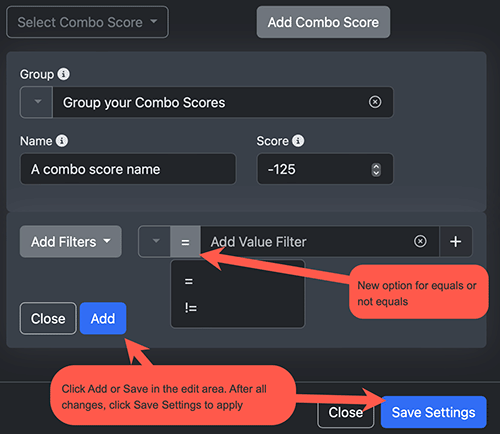
- The service has hundreds of Filters (metadata hits) such as Email:Free, Email:Disposable, Domain:High Risk as well as analyizing all the API call data.
- Free emails (from services like gmail.com and outlook.com) PLUS IP Geo from Russia
Create a rule: filter:Email:free AND value:GeoIPCountry:=ru"
- Domains ending in .xyz or .zzz PLUS domain age is less than 5 days
Create a rule: filter:Domain:Age 1 to 5 Days AND value:domain=*.xyz|*.zzz
- emaildomain and domain NS records
Combo Scoring options include emaildomain and domain values from: EmaildomainMX, EmaildomainNS, DomainNS, DomainMX, DomainWebip.
EmaildomainMX = mx1.teledata-fn.de. fallback.teledata-fn.demx0.teledata-fn.de. fallback.ffm.teledata-fn.de.
EmaildomainNS = auth01.ns.td-fn.net. auth02.ns.td-fn.net.
Create a rule: value:EmaildomainMX:=:mx1.teledata-fn.de|fallback.teledata-fn.demx0.teledata-fn.de|fallback.ffm.teledata-fn.de AND value:EmaildomainNS:=:auth01.ns.td-fn.net|auth02.ns.td-fn.net
Example: Combo Scoring rule for all emaildomains that use smtp.google.com as MX and NS is managed on cloudflair
EmaildomainNS = bill.ns.cloudflare.com. katelyn.ns.cloudflare.com.
Create a rule: value:EmaildomainNS:=:*.ns.cloudflare.com|*.ns.cloudflare.com AND value:EmaildomainMX:=:smtp.google.com
Alerts and Alerts API
Alerts are created when a sign-up or lead score has a significant increase in risk after the initial vetting API call. We track IPs, emails, phones, and fingerprints for new risks every few minutes.
Alerts are created from community data as well as data feeds. If new data is found that matches past API calls, we notify via Alerts. Our goal is to keep you informed when the risk levels of your data changes. Some examples of when Alerts are created:
- an email that scored good yesterday is now reporting as sending phishing emails
- a phone is now linked with several different emails and different names
- an IP associated with new Bot emails is detected. Emails/IPs will be added to alerts
- an emaildomain has changed to use a disposable email service, and all emails are now disposable
- an email that looked OK and did not score as High Risk on your API call now has many moving periods and different names. The emails will then be reported as Moving Period emails in Alerts. An example:
dayfingh@gmail.com (API call on Day 1)
da.yfingh@gmail.com (API call on Day 3)
day.fingh@gmail.com (API call on Day 3)
d.ayfingh@gmail.com (API call on Day 3)
dayfin.g.h@gmail.com (API call on Day 3)
When are Alerts created?
Our system creates Alerts when the risk hit on new data points is equal or higher than your Alert Score Threshold settings. For example, if you have Alert Score Threshold set at -50, then any risk hit matches after the fist API call on that data that you also have set to score -50 or worse will create an alert. Risk hits/labels set to score at -25 will not create alerts. If the initial score was -100 then no alerts are created.
Each Alert lists all the information from the original API call along with username, lead ID, and reason (such as Phishing, Disposable, Botnet) so you can understand the risk impact. Alerts can be configured in the Portal under API Key Settings. You can get Alerts via email or using our Alerts API, even integrate the data into Slack. Other settings include what data to track and the scoring threshold for alerts.
Undeliverable Emails
Emails that will hard bounce are returned with Email: Undeliverable and Email: Invalid TLD (TLD invalid so no email will be delivered). We suggest scoring both of these labels the same to ensure non-working emails are scored properly.
The test/label of Email: MX Record Bad (no MX so email might not be delivered) is usually associated with issues but DNS does not require a defined MX. Our system will still check for Email: Undeliverable on MX Record Bad. Keep an eye on these and score accordingly.
Domains for Sale
We have seen a large spike in domains that are for sale (such as adrid.com, gkil.com) and used by high risk leads. Detection of services that offer domains for sale have been improved. Please adjust scoring of Domain: Parked For Sale to match your risk levels.
Email: Disposable
Disposable emails are often emails that are throw away addresses, many of them lasting just a short time. We consider these as high risk. We have over 50,000 domains on the disposable lists and add many new domains every day. Most we catch at the first API call, but those we miss are also added to Alerts as Disposable so you can remove them from your systems.